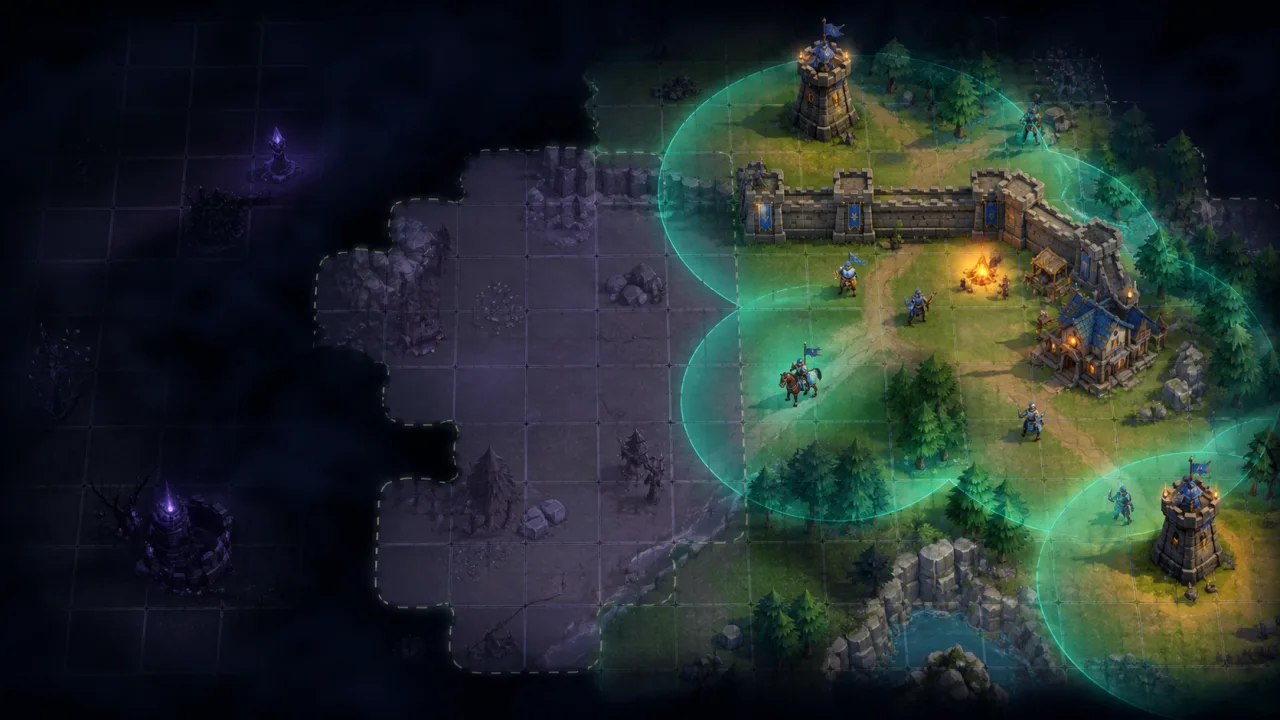
Fog of war lets a game distinguish what the player can see now, what was explored earlier, and what remains completely unknown. The effect looks simple, but a robust implementation must combine many vision sources, respect walls, update only changed areas, preserve explored memory, and stay fast on mobile browsers. This guide builds a practical 2D fog system around a grid, line of sight, dirty regions, and a low-resolution visibility texture.
Define three visibility states
Use three explicit states for every cell or sample: hidden, explored, and visible. Hidden terrain is unknown and usually rendered opaque. Explored terrain keeps a darkened memory of the map but hides dynamic units and changes. Visible terrain shows current objects and effects.
Keep the logical state separate from the visual mask. Gameplay systems such as enemy targeting, minimaps, AI knowledge, and multiplayer replication should read a deterministic visibility grid. The renderer can blur or interpolate that grid without changing game rules.
Choose the grid resolution
A fog cell can match a map tile, but it does not have to. Tile-sized cells are easy to update and align naturally with collision data. Smaller cells create smoother visibility around corners at a higher CPU and memory cost. Larger cells are cheaper but may reveal too much through thin walls.
Begin with one visibility cell per collision tile. Add subcells only when playtesting shows that coarse corners affect decisions. If the world is streamed in chunks, store fog state with the same chunk coordinates used by the map pipeline in HTML5 Tilemap Rendering.
Represent vision sources
Each player unit, scout, camera, watchtower, or temporary reveal effect can be a vision source with a position, radius, team, height or layer, and optional viewing angle. Keep these objects compact and reusable. A source should mark cells currently visible, while the explored grid remembers every cell that has ever been visible to that team.
Update stationary sources only when nearby occluders change. Moving sources need recalculation after crossing a visibility-cell boundary or rotating far enough to change a cone. This threshold approach avoids rebuilding the same result for tiny subpixel movement.
Calculate line of sight
The simplest circular reveal marks every cell within a radius, but it ignores walls. For tactical games, use a grid field-of-view algorithm such as recursive shadow casting, permissive field of view, or symmetric shadow casting. These algorithms walk outward from a source and stop visibility behind opaque cells.
Another option is ray casting from the source to the perimeter of its radius. It is intuitive and works with non-grid geometry, but many rays can be expensive and small gaps may cause flicker. Reserve geometric ray casting for maps that cannot be represented by an opacity grid.
Whichever algorithm you choose, define corner behavior deliberately. Decide whether two diagonally touching walls block vision, whether low cover is visible over, and whether doors become transparent before or after their opening animation.
Reuse spatial data
Fog should not scan every object in the world. Query only occluders and revealable entities near active sources. A spatial hash or chunk lookup maps well to a tiled world; HTML5 Spatial Hash Grid
Static wall opacity can live in the tile chunk. Dynamic doors, smoke, destructible walls, and elevators maintain a small override layer. When an override changes, mark the affected cells and nearby vision sources dirty rather than invalidating the entire map.
Combine multiple sources safely
Use a temporary current-visibility buffer. Clear only its dirty region, then add every relevant source into it. After all sources are processed, update the explored buffer with a logical OR: once explored, a cell remains explored unless the game intentionally resets memory.
Do not let one source clear visibility created by another. Reference counts can work for incremental systems, but they become error-prone when sources teleport or are removed. Recomputing a bounded dirty region from all intersecting sources is often simpler and reliable enough.
Render a low-resolution mask
Convert the current and explored grids into an offscreen canvas or WebGL texture. A hidden cell gets high opacity, an explored cell gets partial opacity or desaturation, and a visible cell is transparent. Scale the mask over the world with filtering enabled to soften block edges.
Keep this texture independent from the main scene resolution. A mask close to the fog grid size is usually sufficient, even on high-DPI displays. Recreate it only when the map or viewport demands a different logical extent.
Add soft edges without changing gameplay
Soft fog boundaries make movement feel natural, but the blur must remain cosmetic. Expand the visible region by one sample for interpolation, blur the mask in a small offscreen pass, or generate a signed-distance approximation around visibility edges. The logical grid still decides whether an enemy can be targeted.
If the game already uses the pipeline from HTML5 Dynamic Lighting System, composite fog after world lighting but before interface rendering. That keeps hidden terrain dark while ensuring buttons, touch controls, and status panels remain readable.
Hide dynamic information correctly
Explored memory should usually show terrain, structures known to be permanent, and the last known position of selected strategic objects. It should not show live enemy movement, newly collected resources, opened doors, or current particle effects unless the design explicitly supports that information.
Tag renderable entities with a visibility policy: visible only, remembered snapshot, always visible, or never affected. This is clearer than scattering fog checks throughout every draw function. Update remembered snapshots only when the entity is actually visible.
Use dirty regions and chunks
Track the previous and current bounds of every moving vision source. Their union becomes a candidate dirty area. Expand it by the vision radius and any blur padding, clamp it to loaded chunks, then recompute only that region. Merge overlapping rectangles before updating textures.
For large maps, keep explored state as compact bitsets per chunk. A hidden, explored, and visible representation can fit into two bits per cell, while the current visibility buffer can be rebuilt as needed. Unload distant visual textures but retain the small explored bitset for saved progress.
Keep updates deterministic
Fog may influence attacks, AI, and multiplayer authority, so logical visibility should update on the fixed simulation step rather than the render rate. Render the latest completed grid and interpolate only the visual mask. The timing pattern in HTML5 Fixed Timestep Game Loop
In multiplayer, the server should remain authoritative for information the client is allowed to receive. Client-side fog is a presentation layer, not a security boundary. Avoid sending hidden enemy state to untrusted clients when competitive integrity matters.
Build performance tiers
- Low: tile-sized cells, hard or lightly filtered edges, updates only after cell transitions, strict source cap.
- Medium: tile or half-tile cells, one-pass softening, chunked dirty regions.
- High: finer cells, smoother mask filtering, more dynamic occluders and remembered details.
Measure field-of-view calculation, source combination, texture upload, and fog compositing separately. Record percentiles during heavy scenes with many moving units. HTML5 Frame-Time Telemetry
Test gameplay and accessibility
Test narrow corridors, diagonal corners, doors, teleporting units, overlapping sources, rapid camera movement, chunk boundaries, saves, restores, and team switching. Confirm that hidden enemies never flash during initialization or after a resize.
Do not communicate visibility states through color alone. Use opacity, contrast, texture, and edge treatment so explored and visible areas remain distinct for colorblind players. Apply the recommendations in HTML5 Colorblind-Friendly Modes and keep essential controls legible with HTML5 High-Contrast Settings.
Implementation checklist
- Separate hidden, explored, and currently visible logic.
- Choose a grid resolution that matches gameplay precision.
- Use a deliberate field-of-view algorithm with defined corner rules.
- Combine sources into a temporary visibility buffer.
- Update explored memory only from confirmed visibility.
- Render fog through a scalable offscreen mask.
- Recompute dirty chunks instead of the whole world.
- Keep server authority and accessibility requirements in view.
A strong fog-of-war system is predictable before it is beautiful. Build deterministic visibility first, add explored memory second, then soften the result in the renderer. With chunked updates and a low-resolution mask, even large HTML5 maps can deliver tactical concealment without sacrificing frame time on mobile devices.