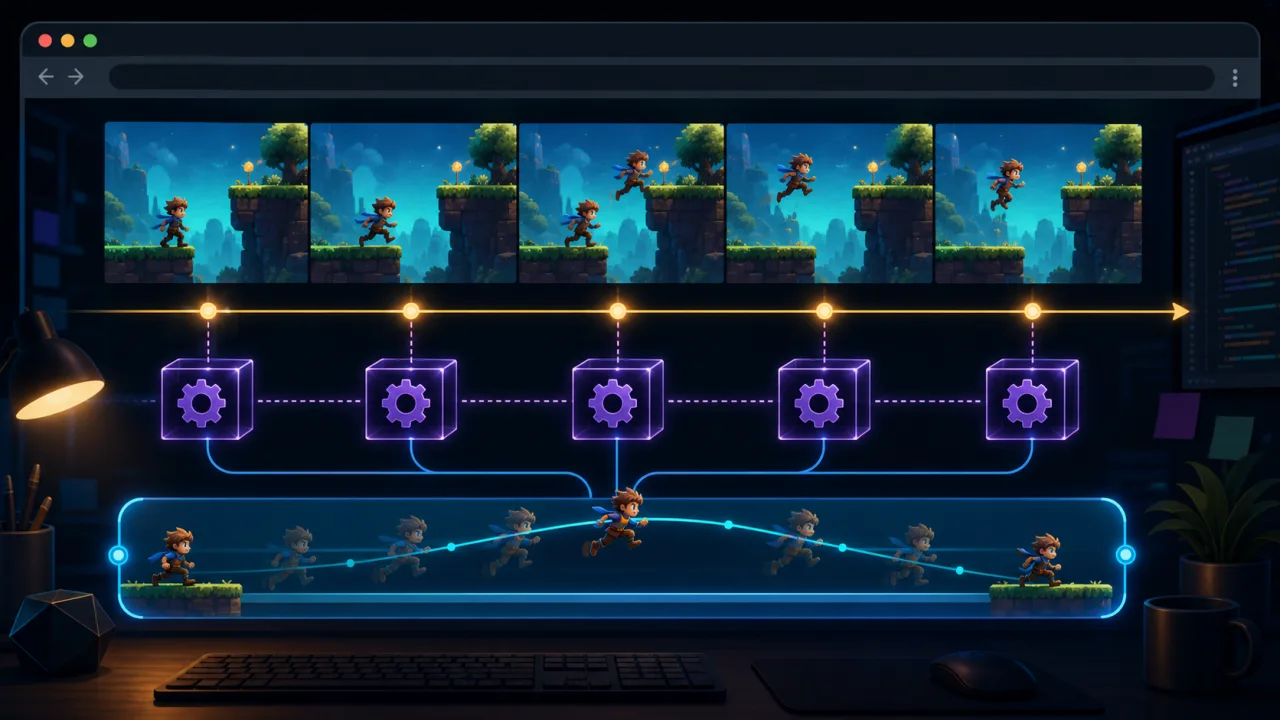
A fixed-timestep game loop updates gameplay at a constant rate even when rendering speed changes. This keeps movement, collisions, timers, and seeded randomness stable across fast desktops, low-powered phones, and temporary frame drops in the browser.
Why variable delta time can become fragile
A simple loop often multiplies every movement by the time since the previous frame. That approach works for many visual effects, but large or irregular frame intervals can make collision detection unreliable, physics unstable, and input feel inconsistent. Browser tabs can pause, mobile devices can throttle, and one expensive frame can produce a very large update.
A fixed step separates simulation time from rendering time. The game might update at 60 simulation steps per second while the browser draws whenever requestAnimationFrame is available. Rendering can interpolate between known states without changing the rules of the simulation.
Build the accumulator loop
Store elapsed real time in an accumulator. While enough time is available, advance the simulation by one fixed step. After updates are complete, render once using the remaining fraction for interpolation.
const STEP = 1 / 60;
const MAX_FRAME = 0.25;

let previous = performance.now() / 1000;
let accumulator = 0;

function frame(nowMs) {
  const now = nowMs / 1000;
  const frameTime = Math.min(now - previous, MAX_FRAME);
  previous = now;
  accumulator += frameTime;

  while (accumulator >= STEP) {
    update(STEP);
    accumulator -= STEP;
  }

  const alpha = accumulator / STEP;
  render(alpha);
  requestAnimationFrame(frame);
}

requestAnimationFrame(frame);
The maximum frame clamp prevents a backgrounded tab from trying to simulate several minutes when it becomes active again. Choose a policy that matches your game: pause, fast-forward a controlled amount, or reconcile against server time.
Keep simulation and rendering separate
The update function should own authoritative state: positions, velocities, health, cooldowns, AI, and collision results. The render function should read that state without changing it. Store both the previous and current transform for objects that need smooth interpolation.
function render(alpha) {
  player.spriteX =
    player.previousX +
    (player.currentX - player.previousX) * alpha;
}
Interpolation affects only what the player sees. Collision tests still use the fixed simulation state. This separation makes the game smoother without introducing fractional gameplay updates.
Avoid the spiral of death
If each update takes longer than the fixed step, the accumulator grows and the loop tries to perform more updates, making the next frame even slower. Limit the number of simulation steps allowed in one rendered frame and record when the limit is reached.
Optimize the update path, pool frequently created objects, and reduce expensive work on lower-powered phones. The mobile guidance in making HTML5 games work better on mobile browsers helps identify rendering and layout costs that can steal time from the simulation.
Process input on simulation ticks
Collect browser events into an input state or command queue, then consume them during fixed updates. Short button presses should not disappear between ticks. The approach described in HTML5 game input buffering works well when commands carry timestamps or target tick numbers.
For multiplayer or replays, define a deterministic order when several commands share a tick. Avoid reading live DOM state from deep inside the simulation; translate browser input into simple game commands at the boundary.
Handle pause and tab visibility explicitly
When the document becomes hidden, decide whether the game should pause or continue using server-authoritative time. Reset the previous frame timestamp when returning so the hidden interval does not become one giant frame. Coordinate this with the behavior in your responsive pause menu.
Audio, animations, and particles may use real time while gameplay is paused, but they must not secretly advance authoritative state. Resume through one controlled transition that clears stale inputs and restores the correct accumulator policy.
Use fixed steps for reproducibility
A constant update rate is a major building block for deterministic testing. Combine it with deterministic random seeds, a stable input order, and state checksums. The same seed and command sequence should then produce the same important results.
JavaScript floating-point behavior is generally consistent enough for many browser games, but deterministic networking may still need integer units, fixed-point arithmetic, or periodic authoritative corrections. Test across the browsers and devices you actually support.
Test the loop under stress
- Run rendering at 30, 60, 120, and 144 frames per second.
- Inject long frames and confirm the clamp works.
- Hide and restore the tab without a simulation burst.
- Verify interpolation never changes collision state.
- Test input presses shorter than one fixed step.
- Track dropped simulation time and maximum updates per frame.
A fixed-timestep loop gives an HTML5 game a stable clock for gameplay. Once simulation, input, and rendering have clear boundaries, performance tuning becomes easier and the game behaves more consistently across devices.