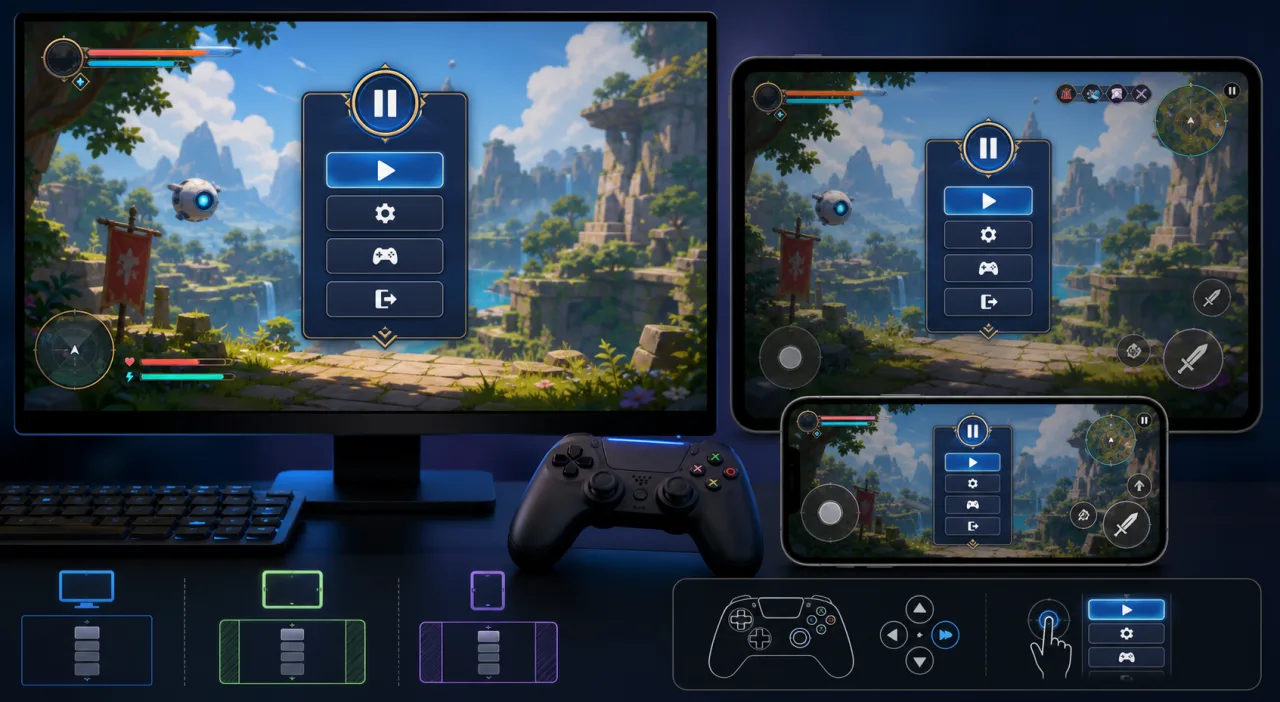
A pause menu looks simple, but it sits at the intersection of game state, input, audio, accessibility, and responsive layout. A reliable implementation must stop the right systems, preserve player context, and remain usable on a phone, desktop, or controller-driven screen.
Define what pause means
Decide which systems freeze and which continue. Local gameplay, timers, enemy AI, physics, and spawning usually stop. UI animation, settings previews, network heartbeats, or multiplayer simulation may need to continue. Treat pause as an explicit state instead of scattering boolean checks throughout the game.
Use a clear state transition
Route keyboard, controller, and touch actions through one pause controller. Ignore repeated requests while a transition is running, remember the previous state, and return to it only when resume succeeds. Prevent gameplay inputs from leaking through the overlay.
Design a flexible menu hierarchy
Keep the first screen short: Resume, Settings, Controls, Restart or Exit when appropriate. Use large targets, predictable focus order, and a visible selected state. Longer settings should open nested panels without unpausing the game.
Make the layout responsive
Use a centered panel with maximum width, flexible height, and safe-area padding. Allow labels to wrap and make the content scroll when landscape phones have little vertical space. Test the guidance in HTML5 games on mobile browsers and avoid placing essential actions beneath touch controls or browser chrome.
Support every active input method
Escape or a dedicated key can toggle pause, but never trap keyboard focus. Map a controller menu button, add a reachable touch icon, and debounce all sources. When the menu opens, move focus to Resume; when it closes, restore focus to the canvas or previous control. Related patterns are covered in keyboard remapping and reliable gamepad support.
Handle audio and animation intentionally
Duck or pause gameplay channels while keeping menu feedback audible. Preserve playback positions so music and ambience resume cleanly. If the overlay animates, respect the player's preference from reduced motion settings.
Manage multiplayer and visibility changes
In an online game, opening a menu may not pause the server. Say so clearly and protect the player only through game-specific rules. Decide what happens when the browser tab becomes hidden: automatic pause may suit a single-player game, while multiplayer requires reconnection and timeout handling.
Preserve and restore context
Do not rebuild the level simply because the menu opened. Save current selection, camera state, active dialogue, pointer-lock state, and input mode. Request pointer lock again only after an explicit player action, since browsers may reject automatic restoration.
Accessibility checks
Use semantic buttons for DOM overlays, visible focus indicators, sufficient contrast, readable labels, and status announcements where useful. Keep the menu operable at larger text sizes using text scaling and readability settings. Do not communicate disabled or selected states by color alone.
Test failure-prone paths
- Pause during combat, dialogue, loading boundaries, and cutscenes.
- Resume with keyboard, touch, and controller.
- Rotate a phone while paused.
- Open nested settings and return without losing focus.
- Hide and restore the browser tab.
- Reconnect a controller while the menu is open.
- Confirm timers and scheduled events do not jump forward.
Common mistakes
- Freezing the render loop so the menu cannot update.
- Letting clicks reach gameplay behind the overlay.
- Using a fixed-height panel that clips on mobile.
- Unpausing when a nested settings panel closes.
- Assuming multiplayer can be paused locally.
- Losing pointer lock or focus without a recovery path.
Implementation checklist
- Create one authoritative pause state.
- List systems that stop and continue.
- Centralize keyboard, touch, and controller actions.
- Build a flexible safe-area-aware overlay.
- Manage focus, audio, pointer lock, and nested panels.
- Define hidden-tab and multiplayer behavior.
- Test every transition on narrow and wide screens.
A good pause menu is a dependable state-management feature, not merely an overlay. With clear ownership, responsive layout, input parity, and careful restoration, players can step away and return without losing control or context.