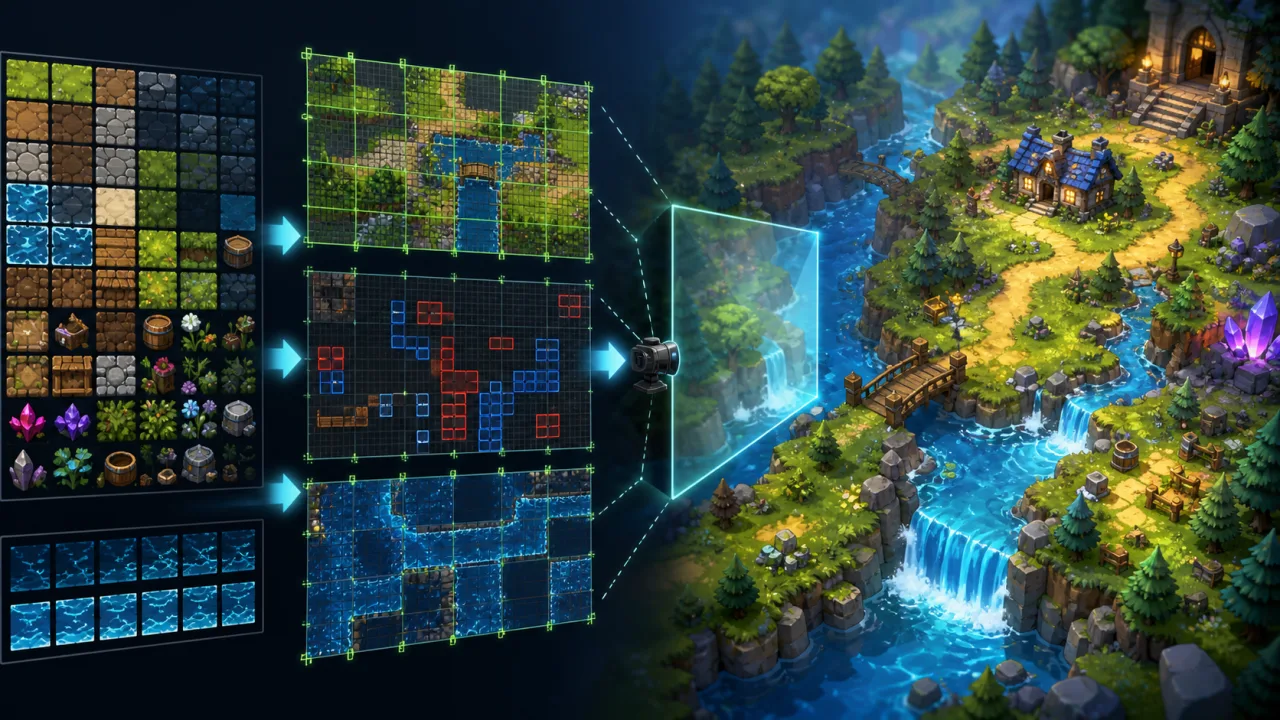
Tilemaps let a game build large worlds from a compact set of reusable images, but a naive renderer can waste time drawing thousands of invisible cells. A production HTML5 tilemap system needs clear data boundaries, efficient culling, predictable layer order, and a path from editing tools to Canvas 2D or WebGL. This guide develops that architecture without tying it to one engine.
Separate map data from rendering
The map describes what exists; the renderer decides how visible cells become pixels. Keep tilesets, layers, objects, collision metadata, and custom properties in an immutable map model. Store transient camera, chunk cache, animation time, and GPU buffers in the renderer.
const map = {
  tileWidth: 32,
  tileHeight: 32,
  width: 240,
  height: 160,
  layers: [
    { name: "ground", visible: true, data: groundIds },
    { name: "details", visible: true, data: detailIds }
  ]
};
Use numeric tile IDs that reference atlas metadata. Avoid storing image objects or renderer callbacks inside every cell; large maps multiply even small per-tile costs.
Define tileset metadata once
For each tile, record its atlas rectangle, pivot, collision shape, animation sequence, render flags, and gameplay properties. Normalize imported editor data into one internal format during loading. The rest of the game should not need to know whether the source was Tiled, LDtk, or a custom JSON file.
Load atlas images and map data together through the pipeline described in HTML5 asset streaming and prefetching. Validate tile IDs before the level starts so a malformed cell does not fail deep inside the draw loop.
Convert the camera to visible cell bounds
Transform the camera rectangle from world coordinates into tile coordinates. Expand the result by one tile on every side to cover subpixel movement and oversized art. Clamp the bounds to the map, then iterate only those rows and columns.
const minCol = Math.max(0, Math.floor(camera.x / tileW) - 1);
const maxCol = Math.min(mapW - 1, Math.ceil((camera.x + camera.w) / tileW) + 1);
const minRow = Math.max(0, Math.floor(camera.y / tileH) - 1);
const maxRow = Math.min(mapH - 1, Math.ceil((camera.y + camera.h) / tileH) + 1);
Keep camera transforms stable with the methods in the smooth camera system guide. Pixel art may need integer snapping, while high-resolution art usually benefits from subpixel interpolation.
Render layers with explicit ordering
Give every layer a stable order and role: background, ground, decals, gameplay objects, foreground, lighting, and UI. Tile layers should not silently reorder entities. If characters must appear behind tall scenery, use a dedicated overhang layer or a depth-sorted object pass.
- Skip hidden layers before calculating any visible cells.
- Apply layer opacity and parallax once per pass, not per tile.
- Group compatible layers when they share atlas, blend mode, and shader.
- Keep collision layers out of the visual renderer unless debug mode is enabled.
Choose chunks for large or streaming worlds
Divide large maps into chunks such as 16×16 or 32×32 cells. Maintain a sparse dictionary keyed by chunk coordinates, and load only chunks near the camera. Chunking reduces memory for empty worlds and creates a natural unit for streaming, caching, and dirty-region updates.
For Canvas 2D, pre-render static chunks to offscreen canvases. Redraw a chunk only when one of its tiles changes. For WebGL, build one vertex buffer per visible chunk and update it only when dirty. Do not make chunks so large that editing one tile forces a costly rebuild.
Batch WebGL tiles by render state
Tiles that share texture, shader, blend mode, and layer can be drawn in one batch. Build each tile as a quad with atlas UV coordinates and world positions. Append visible quads to a reusable typed array, then issue one draw call per compatible batch.
A texture atlas is crucial because switching textures for individual tiles defeats batching. The data-driven atlas approach also aligns with the sprite animation system, allowing characters, effects, and maps to share loader and metadata conventions.
Animate tiles without duplicating state
Water, torches, signs, and machinery may animate. Store animation definitions per tile type, not per cell. A global animation clock selects the current frame for all identical cells. Add a deterministic phase offset only when variation is needed.
Advance animation from elapsed simulation time rather than render count. Follow the stable timing principles in the fixed-timestep loop guide. If animated tiles are decorative and expensive, reduce their update frequency on low-power devices.
Keep collision independent from pixels
Collision data should reference shapes or semantic flags such as solid, one-way, ladder, water, and damage. Do not infer collision by reading image pixels. Convert nearby collision tiles into shapes or query the grid directly for small axis-aligned actors.
For fast-moving entities, combine broad tile-grid queries with the techniques in continuous collision detection. Test slopes, one-way platforms, map boundaries, and transitions between adjacent shapes.
Support flipped and rotated tiles
Map editors often encode horizontal flip, vertical flip, and diagonal rotation in tile ID bits. Decode these flags during import or immediately before buffer generation. Apply transforms around the tile pivot, not the world origin. Include transformed collision shapes when the editor expects them to rotate with the art.
Avoid garbage collection in the hot path
Reuse visible-range objects, batch buffers, chunk records, and temporary vectors. Do not allocate a destination rectangle for every cell. Empty tiles should exit with one integer comparison. Precompute atlas UVs and frequently used transforms.
Measure improvements with frame-time telemetry. Track visible tiles, culled tiles, batch count, buffer upload bytes, chunk rebuilds, and render time. These counters reveal whether the bottleneck is map size, overdraw, or state changes.
Control overdraw and memory on mobile
Large transparent tiles can draw the same pixels repeatedly. Keep opaque ground in an early pass, trim atlas regions where practical, and avoid full-screen translucent decoration. Use smaller chunk cache radii and compressed atlas formats when memory is constrained.
Offer quality tiers for animated decoration, parallax layers, particles, and lighting. The core collision and gameplay tiles must remain identical across tiers. Reuse pooled objects for temporary map effects, following the object pooling guide.
Build practical debugging tools
Add toggles for tile coordinates, chunk boundaries, collision shapes, layer names, dirty chunks, camera bounds, and overdraw. Allow clicking a cell to inspect its tile ID and properties. A single-frame step and deterministic test camera make rendering bugs repeatable.
Production checklist
- Normalize editor data into one validated map model.
- Cull by camera bounds and chunk large or sparse worlds.
- Use atlases, reusable buffers, and stable layer ordering.
- Keep animation definitions shared by tile type.
- Separate collision metadata from visual pixels.
- Decode flip and rotation flags consistently.
- Measure visible cells, batches, uploads, and chunk rebuilds.
- Test mobile memory, resize behavior, zoom, and camera edges.
A good tilemap renderer spends almost no time on invisible cells and rarely rebuilds static work. With normalized metadata, chunk-level caching, strict layer rules, and measured batching, the same system can power a compact puzzle level or a wide scrolling world while staying smooth in the browser.