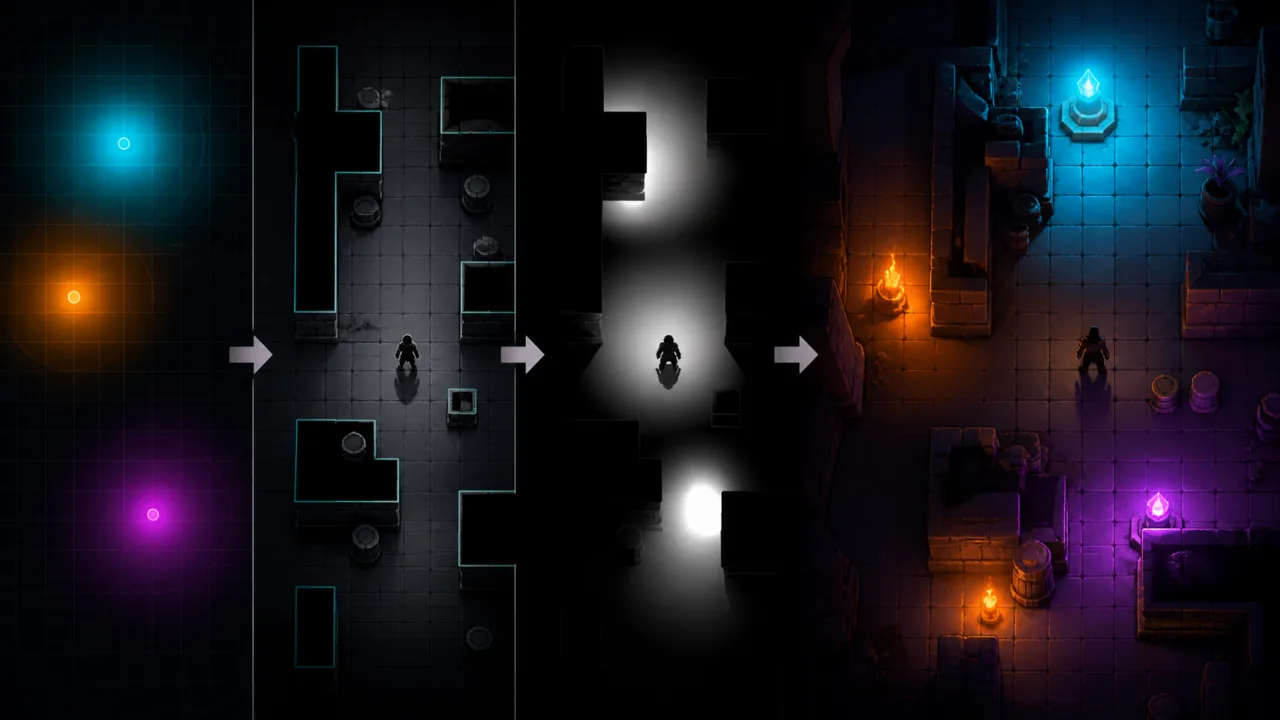
Dynamic lighting can turn a flat HTML5 game scene into a place with depth, focus, and atmosphere. The trick is to make the effect predictable and affordable: lights should react to walls, shadows should remain stable, and low-powered phones should not pay the cost of a desktop-quality pipeline. This guide builds a practical 2D lighting system from light data, occluders, render targets, compositing, and measurable quality tiers.
Start with a simple lighting model
Render the world normally, then create a separate light map. Clear that map to the scene’s ambient color, draw every visible light additively, subtract or block regions hidden by occluders, and finally multiply or screen the result over the world. Separating lighting from scene rendering makes the system easier to debug and lets you reduce light-map resolution without reducing the resolution of sprites or UI.
Keep gameplay state independent from the visual effect. A torch can have position, radius, color, intensity, falloff, direction, and enabled state. The renderer decides how those values appear at the current quality level.
Define compact light data
A point light needs a world position, radius, RGB color, intensity, and optional flicker profile. A cone light adds a direction and angle. An area light can be approximated with a small set of overlapping point lights or a stretched signed-distance texture. Store lights in reusable objects so temporary effects do not create garbage every frame.
If explosions, spells, or projectiles create many brief lights, apply the allocation rules in HTML5 Object Pooling. Reset every field when returning a light to the pool; stale colors or radii create visual bugs that are hard to reproduce.
Build the light map
For Canvas 2D, an offscreen canvas is the simplest render target. For WebGL, use a framebuffer-backed texture. The light map does not need full display resolution. Half resolution usually preserves smooth gradients, while quarter resolution can work on mobile if the final composite is filtered carefully.
Begin with a radial gradient texture whose center is white and edge is transparent. Tint and scale it for each point light, using additive blending. Reusing one small texture is cheaper than rebuilding a gradient for every light. Cone lights can use a masked texture or a lightweight shader that evaluates angle and distance.
Keep the UI outside this composite unless darkness is meant to affect it. Health bars, touch controls, and menus need stable contrast regardless of the scene’s ambient light.
Represent occluders efficiently
Walls, closed doors, and large props can become line segments or convex polygons. For tilemaps, generate occluder edges only where a solid tile meets empty space; internal edges between two solid tiles are unnecessary. Merge adjacent collinear segments to reduce the amount of shadow geometry.
This connects naturally to the data pipeline in How to Build a Tilemap Rendering System for HTML5 Games. When a door opens or a wall breaks, mark only the affected chunk’s occluder mesh dirty instead of rebuilding the entire level.
Create shadows with volumes
For each light and each relevant occluder edge, project the edge’s endpoints away from the light far enough to leave the light radius. The original edge and projected points form a shadow quad. Draw those quads into a mask before the light is added, or draw them with subtractive blending after the light texture.
Reject edges facing away from the light and ignore occluders outside the light radius. A spatial index prevents every light from testing every wall. Use a grid or spatial hash such as the one described in HTML5 Spatial Hash Grid to query only nearby segments.
Soft shadows need restraint. A convincing approximation is often better than many samples. Blur a low-resolution shadow mask, use a small penumbra texture, or render two to four jittered shadow volumes. Reserve more expensive techniques for the main light and use hard or blurred shadows for minor lights.
Composite without washing out the art
Choose the ambient color deliberately. Pure black hides too much detail and encourages excessive light intensity. A dark blue, purple, or warm gray often preserves the palette. Multiply the world by the light map, then add emissive sprites such as flames, neon signs, and magic effects so they remain vivid.
Use premultiplied alpha consistently. Mixing straight and premultiplied alpha creates dark halos around lights and sprites. Test the pipeline against transparent edges, particles, and animated sprites. The systems in HTML5 Sprite Animation System and HTML5 Particle System are useful integration points.
Cull, batch, and cache
First cull lights outside the camera plus their radius. Then cap the number of shadow-casting lights visible at once. Sort or group lights that share textures and blend state. In WebGL, place light attributes in a dynamic buffer or instance stream rather than issuing a state-heavy draw for every light.
Cache static contributions. A lamp that never moves in a room with fixed walls can reuse its light-and-shadow texture until the room changes. Dynamic characters may receive a cheaper unshadowed fill light, while the environment uses cached shadows. This hybrid approach produces most of the visual benefit at a fraction of the cost.
Animate lights deterministically
Random per-frame intensity produces noisy flicker and different results at different frame rates. Drive flicker from game time with a smooth noise function or a short looping curve. Clamp the range so it does not undermine visibility. Update animation in the game simulation, then interpolate its visual value during rendering.
A stable update loop matters when lights affect stealth or hazards. Follow the fixed-step pattern in HTML5 Fixed Timestep Game Loop so gameplay decisions do not depend on rendering speed.
Create practical quality tiers
- Low: quarter-resolution light map, a small light cap, no soft shadows, cached static lighting.
- Medium: half-resolution light map, selected shadow casters, one-pass blur.
- High: half or full resolution, more shadow casters, smoother penumbra, richer emissive effects.
Choose the tier from measured frame time, not only device labels. Reduce shadow quality before disabling lighting entirely. Track the cost of light culling, occluder queries, shadow generation, light-map rendering, and compositing separately. HTML5 Frame-Time Telemetry explains how to turn those measurements into actionable budgets.
Protect visibility and accessibility
Lighting must guide players rather than conceal required information. Maintain a minimum brightness around the player, objectives, exits, and touch controls. Do not communicate danger only through red or safe areas only through green. Pair color with shape, animation, iconography, or audio.
Offer brightness and contrast controls, and test palettes using the methods in HTML5 Colorblind-Friendly Modes and HTML5 High-Contrast Settings. Accessibility settings can adjust ambient intensity and light color without changing gameplay rules.
Debug the pipeline visually
Add toggles that show the raw light map, occluder segments, queried spatial cells, shadow quads, cached layers, and per-light bounds. Display the number of active lights and shadow edges beside their CPU and GPU time. These overlays reveal overdraw, gaps between tile edges, and lights that are never culled.
Test with camera zoom, high-DPI displays, resized canvases, tab suspension, device rotation, and context restoration. Verify that render targets are recreated at the right dimensions and that cached lighting is invalidated after a level change.
Implementation checklist
- Render lighting to a separate, scalable light map.
- Use compact light objects and pooled temporary lights.
- Generate only exposed tilemap edges as occluders.
- Query nearby occluders through a spatial index.
- Cap shadow casters and cache static contributions.
- Keep animation deterministic and gameplay independent of quality.
- Measure each lighting stage on mobile hardware.
- Preserve readable UI and offer contrast controls.
A good HTML5 lighting system is not the one with the most samples or shaders. It is the one that preserves the art direction, communicates gameplay clearly, and stays inside its frame budget across devices. Build the pipeline in layers, expose its intermediate results, and let measured performance decide where detail belongs.