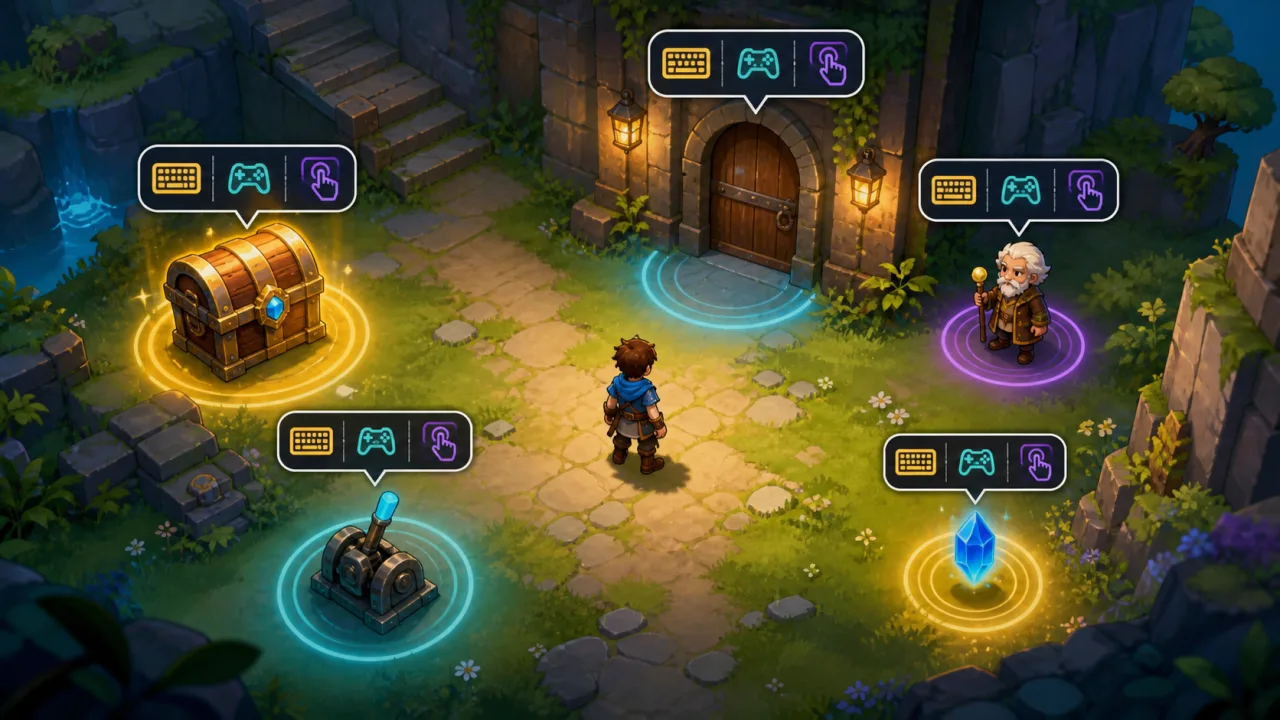
Interaction prompts tell players what they can do before they press a button: open a chest, talk to an NPC, pull a lever, enter a door, or collect an item. In a 2D HTML5 game, a robust prompt system must choose the right target, adapt to keyboard, gamepad, and touch input, and remain readable without embedding UI logic in every object.
Separate interactables from the prompt UI
Give every usable world object a small interaction contract. It can expose a unique ID, world position, interaction radius, priority, action ID, availability check, and prompt label key. The prompt manager discovers eligible objects and decides what to display; the object performs the action only after receiving a validated command.
This separation prevents chests, doors, and characters from creating their own DOM elements. It also fits naturally beside a 2D dialogue system, where an NPC interaction can hand control to dialogue without duplicating input code.
Detect nearby targets efficiently
For a small scene, test the player's distance to each registered interactable once per frame or at a lower fixed rate. Larger maps should query only nearby objects through the same spatial hash grid used for collision or AI. Filter candidates in a predictable order:
- The interactable is enabled and visible.
- The player is inside its activation radius.
- Line of sight or facing requirements are satisfied.
- The current game state allows the action.
- The object is not blocked by a modal menu or cutscene.
Return candidate records rather than mutating the UI during the scan. That keeps detection testable and lets the selection step resolve conflicts consistently.
Choose one prompt with a scoring rule
Multiple objects often overlap. Score each candidate using distance, explicit priority, facing alignment, and whether it was selected on the previous frame. A small persistence bonus prevents the prompt from flickering between two nearby targets when the player stands on a boundary.
Use deterministic tie-breaking, such as a stable object ID. Do not rely on array insertion order because scene-loading differences can change it. If the game supports cycling through nearby actions, keep the highest-scoring target as default and expose the rest through a secondary control.
Represent actions independently from physical keys
The interactable should request an abstract action such as interact, not the letter E or a specific gamepad button. An input-mapping layer resolves that action to the active device. When the player switches from keyboard to controller, the prompt updates its icon without changing the world object.
Track the most recently used input family with a short debounce so minor stick drift does not replace a keyboard hint. The same abstraction used in HTML5 game input buffering can ensure a press made just before the prompt appears still feels responsive without triggering an unintended target.
Build a stable prompt component
The UI component needs an action label, input icon, anchor position, visible state, and optional progress indicator for hold actions. Create it once and update only changed properties. Fade or scale it in briefly, but avoid replaying the entrance animation every frame.
Anchor the prompt in screen space after converting the target's world position through the camera. Clamp it inside safe margins so prompts near the edge remain readable. If the camera moves smoothly, use the same transform pipeline described in a smooth 2D camera system.
Support tap interactions on mobile
Touch users may not have a persistent interact button. Two common patterns work well: a large contextual button in a fixed HUD position, or direct tapping on the highlighted object. Whichever pattern you choose, preserve the same selection and validation pipeline used by keyboard and gamepad.
Make hit targets generous, keep controls inside safe areas, and avoid placing the prompt over the player's thumb zone. Follow the layout principles in HTML5 touch controls and update the hint when the device orientation changes.
Handle holds, cooldowns, and unavailable actions
Some actions require holding a button, such as reviving an ally or opening a heavy gate. Store hold progress in the interaction controller, not in the prompt. Cancel or decay progress when the target changes, the player leaves the radius, or input is released. The UI simply renders normalized progress.
For temporarily unavailable objects, decide whether to hide the prompt or show a disabled explanation. A locked door may benefit from a concise locked state, while a depleted pickup should disappear. Keep failure reasons as localization keys rather than hard-coded sentences.
Design for accessibility
Prompt text and icons must remain clear at different resolutions and zoom levels. Allow larger UI scaling, maintain strong contrast, and never communicate availability through color alone. The guidance in high-contrast game settings helps prompts remain visible against bright and dark scenes.
Offer alternatives to timed holds, respect reduced-motion preferences, and expose prompts to screen-reader-friendly menu surfaces when the game supports them. Remappable action labels should update immediately after a binding change.
Keep the system fast and observable
Reuse candidate arrays, prompt objects, and icon assets to avoid allocations. Update proximity queries at a fixed interval when possible, while keeping input response on every frame. Measure prompt selection and UI updates with frame-time telemetry on lower-powered phones.
Test interactions as pure rules
- Place two targets at equal distance and verify deterministic selection.
- Walk across overlapping radii and confirm the prompt does not flicker.
- Switch keyboard, gamepad, and touch input and verify icons update.
- Open a modal menu and confirm world interactions are blocked.
- Start a hold action, leave the radius, and verify cancellation.
- Resize and rotate the viewport and confirm safe-area clamping.
- Disable an interactable during selection and confirm safe recovery.
A strong 2D interaction prompt system is a coordinator, not a collection of object-specific popups. With a clean interactable contract, deterministic target scoring, action-based input mapping, and accessible responsive UI, players always understand what they can do without the code becoming fragile.