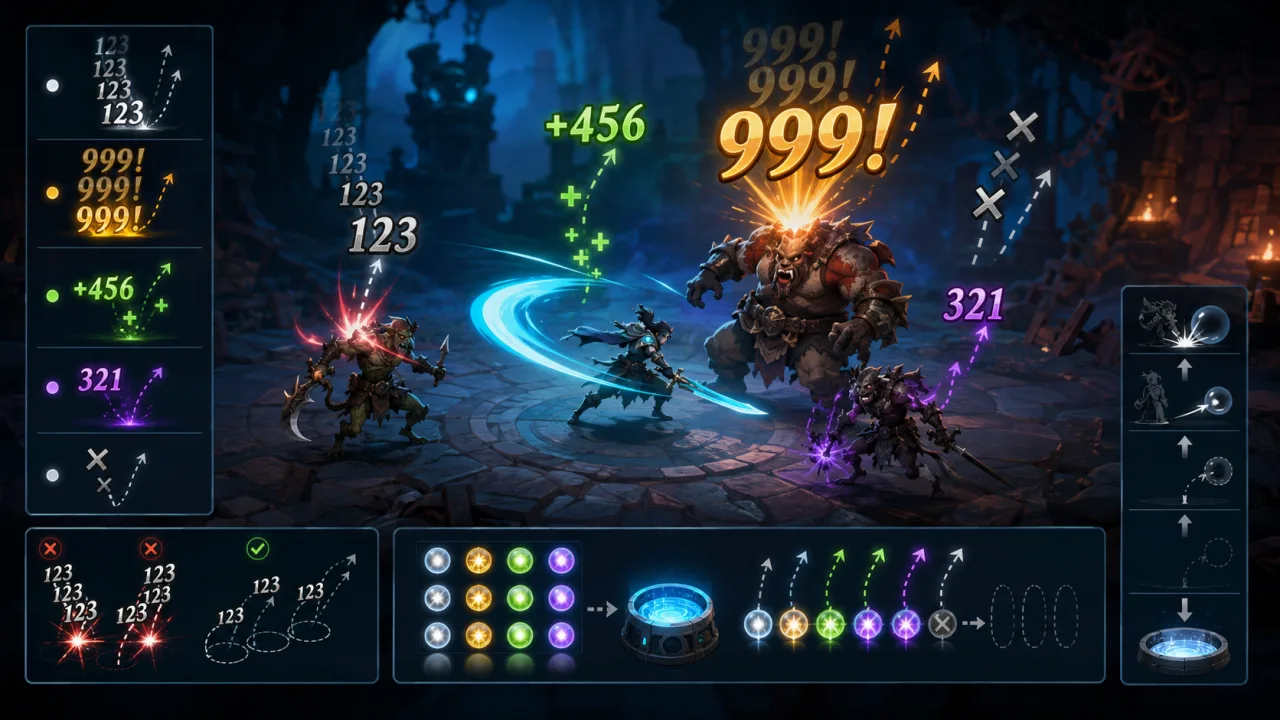
A floating damage number is a tiny interface element with a surprisingly large job: it must confirm a hit, communicate its type and scale, stay readable during a crowded fight, and disappear without stealing attention. A durable HTML5 implementation treats those numbers as short-lived visual effects driven by combat events, not as DOM fragments created ad hoc by every weapon or enemy.
Start with a small, stable event contract
Keep combat math separate from presentation. When the simulation resolves damage, healing, a block, or a miss, emit a compact event containing the amount, kind, target position, critical flag, and an optional source identifier. The renderer should never recalculate damage. This separation prevents mismatches between the health bar and the text players see, and it also makes replays and automated tests easier.
A useful event can include amount, kind, worldX, worldY, critical, and timestamp. Normalize the amount before display so rounding rules are consistent. Reserve text such as “MISS”, “BLOCK”, or “IMMUNE” for explicit result types rather than encoding them as magic numeric values.
Convert world positions at the presentation boundary
Damage belongs to a world-space target, but the label is drawn in screen or UI coordinates. Convert the target anchor through the active camera when the effect is spawned, then decide whether the label should remain attached to the moving target or continue from its original screen position. Continuing from the original point usually produces steadier, easier-to-read feedback in action games.
Account for camera zoom, device pixel ratio, and the safe drawing area. Clamp labels near the viewport edge so a hit on an off-center enemy does not lose half its value. For mobile layouts, use the same safe-area rules as your HTML5 touch controls so combat feedback never hides beneath a notch or browser chrome.
Pool labels instead of allocating during combat
A busy encounter can spawn dozens of numbers per second. Repeatedly creating objects, DOM nodes, or text meshes can add garbage collection spikes at exactly the wrong moment. Use a fixed or expandable pool, following the same principles described in object pooling for HTML5 games.
Each pooled entry only needs an active flag, text, position, velocity, age, lifetime, style key, opacity, and scale. On spawn, reset those fields and activate the entry. On expiry, return it to the free list. If the pool is exhausted, recycle the oldest low-priority normal hit before dropping a critical hit or healing result.
Create a visual hierarchy that does not depend on color
Players should recognize meaning even with color-vision differences or on a low-contrast screen. Give each result type more than one cue. Normal damage can use a steady size and short rise; critical hits can begin larger with a brief scale pulse; healing can include a plus sign; misses and blocks can use distinct words and motion. Color may reinforce those differences, but it should not carry them alone.
Keep the font bold, the outline or shadow restrained, and the digits large enough for the smallest supported phone. Avoid long elastic animations: they add clutter and make old information compete with the next decision. A lifetime between roughly 0.6 and 1.1 seconds is a sensible starting range, tuned against real combat density.
Use controlled variation, not random noise
Identical labels stacked on one pixel become unreadable, yet unrestricted randomness looks jittery. Choose from a small set of horizontal drift directions or lanes, and use a deterministic seed derived from the event sequence. A simple animation can rise quickly, slow near the midpoint, then fade during the final third. Critical labels may add a short scale overshoot, while healing can float more gently.
Deterministic variation is valuable when recording bugs: the same combat event stream produces the same presentation. It also avoids a subtle source of nondeterminism if you use a fixed-timestep game loop.
Prevent overlap before it becomes a wall of text
When several events arrive for nearby targets, assign each new label to the least occupied lane around its anchor. Compare a small bounding box against currently active labels, moving the new entry upward or sideways in fixed increments until it clears. Limit the number of attempts so collision avoidance never becomes an expensive layout solver.
For very rapid attacks, consider aggregation. Several normal hits within a short window can become one updated total, while critical hits, healing, misses, and status changes remain separate. Connect status-related feedback to the same event pipeline used by your 2D status effect system, but avoid showing both an icon and repeated text when one clear cue is enough.
Update and draw in separate passes
The update pass advances age, position, opacity, and scale. The draw pass sorts only if the renderer truly needs ordering, then renders active entries in a batch. Canvas games should group labels by font and style to reduce state changes. DOM-based games should prefer transforms and opacity, avoiding layout-triggering properties such as top and left on every frame.
Measure the feature with the same instrumentation used for frame-time telemetry. Track active label count, peak pool use, allocation count, and update/draw cost. Performance tests should include a synthetic burst well above normal gameplay, not just a quiet tutorial encounter.
Respect reduced motion and player settings
Offer controls for label size, duration, and visibility. When the player enables a reduced-motion setting, replace springy scale and curved movement with a short, gentle rise or a stationary fade. Important information such as immunity or healing must remain available even when decorative motion is disabled.
Also pause or clear transient labels when gameplay pauses, a scene changes, or the browser tab becomes hidden. Otherwise stale numbers can appear in a burst after focus returns.
Test the system as combat feedback, not decoration
Unit-test event formatting, rounding, priority, pool recycling, and lifetime boundaries. In integration tests, verify camera transforms at different zoom levels, viewport edges, high device pixel ratios, and rapid scene transitions. On real devices, test a dense encounter while touch controls, particles, and audio are active; an isolated demo hides contention.
Finally, review captures at normal speed. A correct damage-number system should answer three questions instantly: what happened, how important was it, and where did it happen? If the player has to stop tracking the game to read the answer, simplify the motion, shorten the lifetime, or aggregate more aggressively.